

sammlinux sammlinux
  • Ubuntu
    UbuntuShow More
    How To Install and Use Docker CE on Ubuntu 22.04
    26 Min Read
    How To Install and Secure phpMyAdmin on Ubuntu 22.04
    5 Min Read
    How To Secure SSH with Fail2Ban on Ubuntu 22.04
    8 Min Read
    How To Install Uptime Kuma on Ubuntu 22.04
    17 Min Read
    How To Install Ubuntu Server 22.04 LTS with Screenshots
    14 Min Read
  • Rocky Linux
    Rocky LinuxShow More
    How To Install phpMyAdmin on Rocky Linux 9
    15 Min Read
    How To Secure SSH with Fail2Ban on Rocky Linux 9
    12 Min Read
    How To Install Rocky Linux 9.2 Server with Screenshots
    12 Min Read
    How To Set Up a Firewall Using FirewallD on Rocky Linux 9
    8 Min Read
    How To Install Nginx on Rocky Linux 9: A Comprehensive Guide
    10 Min Read
  • Debian
    DebianShow More
    How To Secure SSH with Fail2Ban on Debian 11
    8 Min Read
    How To Install Debian 11 (Bullseye) Server with Pictures
    12 Min Read
    How To Install and Setup Node.js on Debian 11
    6 Min Read
    How To Install PHP 8.2 on Debian 11
    12 Min Read
    How To Install Nginx on Debian 11: A Comprehensive Guide
    9 Min Read
  • Linux
    LinuxShow More
    Best Practices Linux Server Security for System Administrator
    8 Min Read
    A Simple Guide: How To Manage Groups on Linux
    5 Min Read
    How To Manage Log Files Using Logrotate In Linux
    7 Min Read
    The Easy Ways to Check File Size in Linux
    7 Min Read
    How To Backup Files From Remote Linux VPS Using Rsync Script
    12 Min Read
  • CentOS
    CentOSShow More
    How To Secure SSH with Fail2Ban on CentOS 7
    9 Min Read
    How To Install PHP 8.2 on CentOS 7 / RHEL 7
    18 Min Read
    How To Install Apache Web Server on CentOS 7
    11 Min Read
    How To Set Up a Firewall Using FirewallD on CentOS 7
    5 Min Read
    Initial Setup CentOS 7 Server: Secure and Efficient
    9 Min Read
  • DevOps
    DevOpsShow More
    How To Create AWS CloudFront: A Step-by-Step Guide
    10 Min Read
Reading: How To Set Up a Firewall Using FirewallD on CentOS 7
Share
Font ResizerAa
Linux for BeginnersLinux for Beginners
  • Ubuntu
  • Rocky Linux
  • Debian
  • Linux
  • CentOS
  • DevOps
Search
  • Ubuntu
  • Rocky Linux
  • Debian
  • Linux
  • CentOS
  • DevOps
Follow US
Copyright © 2014-2023 Ruby Theme Ltd. All Rights Reserved.

How To Set Up a Firewall Using FirewallD on CentOS 7

Samuel Siahaan
By Samuel Siahaan
Last updated: September 11, 2023
SHARE

Generally in the digital age, where information travels at the speed of light, ensuring the security of your server is paramount. One of the most effective ways to bolster your server’s security is by setting up a firewall. In this article, we will walk you through the process of setting up a firewall using FirewallD on CentOS 7. No need to fret if you’re not a tech expert. We’ll explain things using everyday language and guide you through each step.

Contents
Table of ContentsUnderstanding FirewallsGetting StartedStep 1: Check FirewallD StatusStep 2: Enable FirewallD on CentOS 7Step 3: Set FirewallD to Start at BootBasic Firewall ConfigurationStep 4: Allow SSH Access on CentOS 7Step 5: Reload FirewallD on CentOS 7Advanced Firewall ConfigurationStep 6: List Available Services on CentOS 7Step 7: Allow Additional Services on CentOS 7Step 8: Block a Port on CentOS 7Monitoring Firewall Rules on CentOS 7Conclusion

Table of Contents

  • Understanding Firewalls
  • Getting Started
    • Step 1: Check FirewallD Status
    • Step 2: Enable FirewallD on CentOS 7
    • Step 3: Set FirewallD to Start at Boot
  • Basic Firewall Configuration
    • Step 4: Allow SSH Access on CentOS 7
    • Step 5: Reload FirewallD on CentOS 7
  • Advanced Firewall Configuration
    • Step 6: List Available Services on CentOS 7
    • Step 7: Allow Additional Services on CentOS 7
  • Monitoring Firewall Rules on CentOS 7
  • Conclusion

Understanding Firewalls

Before we dive into the setup process, let’s grasp the basics. A firewall is like a virtual fence around your server. It monitors and controls incoming and outgoing network traffic, acting as a barrier against potential threats.

FirewallD is a dynamic firewall management tool that simplifies the firewall configuration process. It’s the go-to choice for CentOS 7 users.

Getting Started

Now, let’s roll up our sleeves and get to work.

- Advertisement -

Step 1: Check FirewallD Status

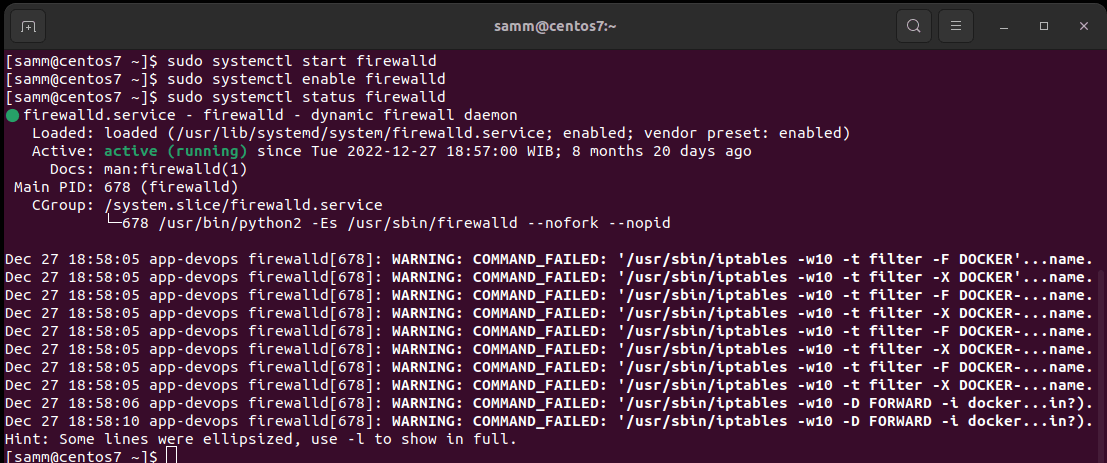
Firstly, ensure that FirewallD is installed and running on your CentOS 7 server. Open your terminal and execute the following command:

Bash
$ sudo systemctl status firewalld

Step 2: Enable FirewallD on CentOS 7

If FirewallD is not active, enable it with this following command:

Bash
$ sudo systemctl start firewalld

Step 3: Set FirewallD to Start at Boot

To ensure FirewallD starts automatically on your CentOS 7 upon server reboot, run this following command:

Bash
$ sudo systemctl enable firewalld
Set Up Firewalld on Centos 7
Status Firewalld on CentOS 7

Basic Firewall Configuration

With FirewallD up and running, let’s configure some basic rules to secure your server.

Step 4: Allow SSH Access on CentOS 7

Allow SSH access to your CentOS 7 server so you can manage it remotely. Execute the following command:

- Advertisement -
Bash
$ sudo firewall-cmd --zone=public --add-service=ssh --permanent

This command permits SSH traffic and makes the rule permanent.

Step 5: Reload FirewallD on CentOS 7

To apply the changes, reload FirewallD:

Bash
$ sudo firewall-cmd --reload

Advanced Firewall Configuration

Now, let’s explore some advanced configurations to further enhance your server’s security.

- Advertisement -

Step 6: List Available Services on CentOS 7

To see a list of available services you can allow or deny, use this following command:

Bash
$ sudo firewall-cmd --list-services

Step 7: Allow Additional Services on CentOS 7

You can add more services to the allowed list using the following command. Then replace http with the service you want to allow, and don’t forget to reload FirewallD afterward:

Bash
$ sudo firewall-cmd --zone=public --add-service=http --permanent
$ sudo firewall-cmd --reload

Step 8: Block a Port on CentOS 7

To block a specific port, replacing PORT_NUMBER with the desired port. Use this following command:

Bash
$ sudo firewall-cmd --zone=public --remove-port=PORT_NUMBER/tcp --permanent
$ sudo firewall-cmd --reload

Monitoring Firewall Rules on CentOS 7

To check the rules you’ve set up, use this following command:

Bash
$ sudo firewall-cmd --list-all

Conclusion

Setting up a firewall using FirewallD on CentOS 7 is a fundamental step in securing your server. In this article, we’ve covered the essential steps in a user-friendly way. Remember, server security is an ongoing process, so keep an eye on your firewall rules and update them as needed to stay protected in the ever-evolving digital landscape.

Also Read Our Other Guides :

  • How To Set Up a Firewall Using FirewallD on Rocky Linux 9
  • How To Set Up a Firewall with UFW on Debian 11
  • How To Set Up a Firewall with UFW on Ubuntu 22.04
  • Initial Setup Debian 11 Server: Secure and Efficient
  • Initial Setup Ubuntu Server 22.04: Secure and Efficient
  • Initial Setup Rocky Linux 9 Server: Secure and Efficient
  • How To Install RTMP Server with Nginx on CentOS 7

Finally, now you have learned how to set up a firewall using FirewallD on CentOS 7.
TAGGED:CentOSFirewallFirewallDSecurityServer Guide

Sign Up For Daily Newsletter

Be keep up! Get the latest breaking news delivered straight to your inbox.
[mc4wp_form]
By signing up, you agree to our Terms of Use and acknowledge the data practices in our Privacy Policy. You may unsubscribe at any time.
Share This Article
Facebook Copy Link Print
Previous Article How To Set Up a Firewall with UFW on Ubuntu 22.04
Next Article How To Set Up a Firewall Using FirewallD on Rocky Linux 9
Leave a Comment

Leave a Reply Cancel reply

Your email address will not be published. Required fields are marked *

How To Install and Secure phpMyAdmin on Ubuntu 22.04
Ubuntu
Install and Configure Docker Swarm Mode on Centos 7
CentOS
How To Install and Config Thumbor on Debian 10
Debian
How To Install MariaDB 10.6 on Debian 11 Server
Debian
How To Install MongoDB 6.0 on Debian 10 & 11
Debian

You Might Also Like

Rocky Linux

How To Install a MinIO Object Storage Server on Rocky Linux (Part 1)

16 Min Read
Ubuntu

How To Secure SSH with Fail2Ban on Ubuntu 22.04

8 Min Read
CentOS

How To Install PHP 8.2 on CentOS 7 / RHEL 7

18 Min Read
Debian

How To Install Debian 11 (Bullseye) Server with Pictures

12 Min Read
Ubuntu

How To Set Up a Firewall with UFW on Ubuntu 22.04

7 Min Read
Rocky Linux

How To Set Up a Firewall Using FirewallD on Rocky Linux 9

8 Min Read
Linux

How To Configure SSH Key-based Authentication In Linux

7 Min Read
CentOS

How To Build NGINX from Source (Compile) on Centos7

14 Min Read
Show More

Always Stay Up to Date

Subscribe to our newsletter to get our newest articles instantly!

sammlinux sammlinux

Providing beginner-friendly Linux tutorials and open-source guides to simplify your digital infrastructure.

www.sammlinux.com © 2026 | All Rights Reserved

Join Us!
Subscribe to our newsletter and never miss our latest news, podcasts etc.

Subscribe to our newsletter to get our newest articles instantly!

Zero spam, Unsubscribe at any time.
Welcome Back!

Sign in to your account

Username or Email Address
Password

Lost your password?