

Introduction
In today’s digital landscape, securing web servers is of paramount importance to ensure the confidentiality, integrity, and availability of online services. Nginx, a popular web server, is widely used for hosting websites and applications due to its performance and scalability. Let’s Encrypt, on the other hand, provides free SSL/TLS certificates, enabling secure communication between clients and servers. In this guide, we will delve into the process of how to securing Nginx with Let’s Encrypt on Rocky Linux 9, combining the power of a robust web server with the security of trusted certificates.
Table of Contents
Key Features Let’s Encrypt
Key features of Let’s Encrypt include:
- Free Certificates: Let’s Encrypt offers SSL/TLS certificates at no cost, making it more accessible for website owners to secure their websites and protect their users’ data.
- Automated Certificate Issuance and Renewal: Let’s Encrypt provides automated tools and protocols (such as ACME – Automated Certificate Management Environment) that allow website administrators to obtain and renew SSL/TLS certificates easily and with minimal manual intervention.
- Encouraging HTTPS Adoption: By providing free SSL/TLS certificates, Let’s Encrypt aims to encourage website owners to adopt HTTPS (HTTP Secure) for their websites, promoting a more secure and privacy-focused web.
Let’s Encrypt has played a significant role in making HTTPS more accessible and prevalent on the internet. Its efforts have contributed to enhancing online security, protecting user privacy, and fostering a safer browsing experience for users worldwide. Many web hosting providers and platforms have integrated Let’s Encrypt support into their services, making it straightforward for website owners to enable SSL/TLS encryption for their sites.
Prerequisites for Let’s Encrypt on Rocky Linux
This guide assumes that you have the following:
- A Rocky Linux 9 server setup, as described in the Initial Setup Rocky Linux 9 Server: Secure and Efficient. You should have a non-root user with sudo privileges and an active firewall.
- Nginx installed, as covered in How To Build NGINX from Source (Compile) on Rocky Linux 9.
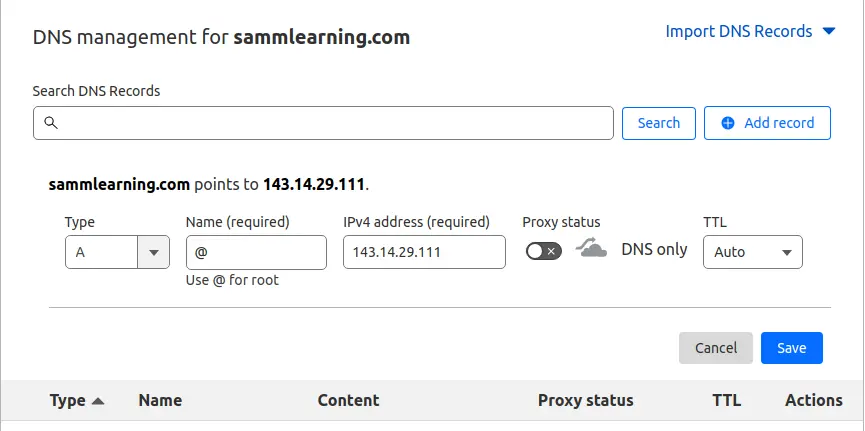
- Next, ensure that you have a Fully Qualified Domain Name (FQDN ) pointing to your server’s public IP. To achieve this, head over to your domain registrar, and in the DNS settings, configure the A record to point the domain name to the server’s Public IP. Below is a snippet of my A record.
- A registered domain name, for this guide, we are using the domain name sammlinux.com which is pointing to the server’s IP address 143.14.29.111.
Secure Nginx with Let’s Encrypt on Rocky Linux 9
In this guide, we will demonstrate how you can secure your nginx with Let’s Encrypt SSL/TLS certificate for NGINX on Rocky Linux 9
Step 1: System Update Rocky Linux 9
Update the package lists by running the following command:
[samm@letsencrypt ~]$ sudo dnf update -y

[samm@letsencrypt ~]$ sudo dnf upgrade --refresh
Extra Packages for Enterprise Linux 9 - x86_64                                                                                                                                     9.5 kB/s | 6.5 kB     00:00
Extra Packages for Enterprise Linux 9 - x86_64                                                                                                                                     4.5 MB/s |  18 MB     00:04
Rocky Linux 9 - BaseOS                                                                                                                                                             2.1 kB/s | 4.1 kB     00:01
Rocky Linux 9 - AppStream                                                                                                                                                          3.3 kB/s | 4.5 kB     00:01
Rocky Linux 9 - Extras                                                                                                                                                             1.8 kB/s | 2.9 kB     00:01
Dependencies resolved.
Nothing to do.
Complete!
Step 2: Installing Certbot on Rocky Linux 9
Certbot is a client that automates the process of obtaining Let’s Encrypt certificates. After the end of life for Centos, Rocky Linux became available. We will install the necessary packages for Let’s Encrypt on Rocky Linux 9.
First, install the EPEL repository which provides additional and high-quality packages for RHEL-based distros.
[samm@letsencrypt ~]$ sudo dnf install epel-release
To install Certbot and certbot module for Nginx, run the following commands:
[samm@letsencrypt ~]$ sudo dnf install certbot python3-certbot-nginx
This installs certbot, certbot module for Nginx host of other packages and dependencies.
Last metadata expiration check: 1:24:54 ago on Fri 28 Jul 2023 03:55:11 AM EDT.
Dependencies resolved.
===================================================================================================================================================================================================================
 Package                                                     Architecture                                Version                                              Repository                                      Size
===================================================================================================================================================================================================================
Installing:
 certbot                                                     noarch                                      2.6.0-1.el9                                          epel                                            18 k
 python3-certbot-nginx                                       noarch                                      2.6.0-1.el9                                          epel                                           156 k
Installing dependencies:
 fontawesome-fonts                                           noarch                                      1:4.7.0-13.el9                                       appstream                                      204 k
 python3-acme                                                noarch                                      2.6.0-1.el9                                          epel                                           160 k
 python3-certbot                                             noarch                                      2.6.0-1.el9                                          epel                                           644 k
 python3-cffi                                                x86_64                                      1.14.5-5.el9                                         baseos                                         241 k
 python3-chardet                                             noarch                                      4.0.0-5.el9                                          baseos                                         209 k
 python3-configargparse                                      noarch                                      1.5.3-1.el9                                          epel                                            39 k
 python3-configobj                                           noarch                                      5.0.6-25.el9                                         appstream                                       62 k
 python3-cryptography                                        x86_64                                      36.0.1-2.el9                                         baseos                                         1.1 M
 python3-idna                                                noarch                                      2.10-7.el9                                           baseos                                          92 k
 python3-josepy                                              noarch                                      1.13.0-1.el9                                         epel                                            60 k
 python3-parsedatetime                                       noarch                                      2.6-5.el9                                            epel                                            79 k
 python3-ply                                                 noarch                                      3.11-14.el9.0.1                                      baseos                                         103 k
 python3-pyOpenSSL                                           noarch                                      21.0.0-1.el9                                         epel                                            90 k
 python3-pycparser                                           noarch                                      2.20-6.el9                                           baseos                                         124 k
 python3-pyparsing                                           noarch                                      2.4.7-9.el9                                          baseos                                         150 k
 python3-pyrfc3339                                           noarch                                      1.1-11.el9                                           epel                                            18 k
 python3-pysocks                                             noarch                                      1.7.1-12.el9                                         baseos                                          34 k
 python3-pytz                                                noarch                                      2021.1-4.el9                                         appstream                                       48 k
 python3-requests                                            noarch                                      2.25.1-6.el9                                         baseos                                         114 k
 python3-urllib3                                             noarch                                      1.26.5-3.el9                                         baseos                                         188 k
Installing weak dependencies:
 python-josepy-doc                                           noarch                                      1.13.0-1.el9                                         epel                                            19 k

Transaction Summary
===================================================================================================================================================================================================================
Install  23 Packages

Total download size: 3.9 M
Installed size: 17 M
Is this ok [y/N]: y
This will install Certbot itself and the Nginx plugin for Certbot, which is needed to run the program.
Now that you have Certbot installed, let’s run it to get a certificate.
Step 3: Nginx’s Configuration on Rocky Linux 9
Certbot requires the capability to locate the accurate server block within your Nginx configuration to autonomously set up SSL. It accomplishes this task by scrutinizing the server_name directive, which should align with the domain you’re applying for a certificate.
To validate this on Rocky Linux 9, access the configuration file for your domain using your preferred text editor.
[samm@letsencrypt ~]$ sudo vi /etc/nginx/conf.d/app-sammlinux.conf
Copy and paste the following lines. Be sure to substitute the sammlinux.com domain name with your own domain.
server {
    listen          80;
    listen          [::]:80;
    server_name     sammlinux.com www.sammlinux.com;
    server_tokens   off;
    root            /opt/app-sammlinux;
    index           index.html index.htm index.php;
    access_log		/var/log/nginx/access-app-sammlinux;
    error_log		/var/log/nginx/error-app-sammlinux warn;
}
Then save the file, quit your editor, and verify the syntax of your configuration edits:
[samm@letsencrypt ~]$ sudo nginx -t
nginx: the configuration file /etc/nginx/nginx.conf syntax is ok
nginx: configuration file /etc/nginx/nginx.conf test is successful
If you get any error, reopen the server block file and check for any typos or missing characters. Once your configuration file’s syntax is correct, restart Nginx to load the new configuration:
[samm@letsencrypt ~]$ sudo systemctl restart nginx
Step 4: Configure the Firewall Rules on Rocky Linux 9
You will need to adjust the firewall settings in order to allow external connections on your Nginx web server.
Use the following command to open the required firewall services/ ports.
[samm@letsencrypt ~]$ sudo firewall-cmd --zone=public --add-service=http --permanent
[samm@letsencrypt ~]$ sudo firewall-cmd --zone=public --add-service=https --permanent
To apply the changes, you’ll need to reload the firewall service:
[samm@letsencrypt ~]$ sudo firewall-cmd --reload
Step 5: Generate Certs using Certbot for Nginx
Certbot provides a variety of ways to obtain SSL certificates through plugins. The Nginx plugin will take care of reconfiguring Nginx and reloading the config whenever necessary.
You have 3 options to install Let’s encrypt;
- General/Simple use: certbot –nginx
- Usage by specifying a website: certbot –nginx -d sammlinux.com
- Multiple websites are written after the command: certbot –nginx -d sammlinux.com -d www.sammlinux.com
To use this plugin, type the following:
[samm@letsencrypt ~]$ sudo certbot --nginx -d sammlinux.com
This runs certbot with the –nginx plugin, using -d to specify the domain names that you need the certificate to be valid for.
Saving debug log to /var/log/letsencrypt/letsencrypt.log
Plugins selected: Authenticator nginx, Installer nginx
Enter email address (used for urgent renewal and security notices)
 (Enter 'c' to cancel): [email protected]

- - - - - - - - - - - - - - - - - - - - - - - - - - - - - - - - - - - - - - - -
Please read the Terms of Service at
https://letsencrypt.org/documents/LE-SA-v1.3-September-21-2022.pdf. You must
agree in order to register with the ACME server. Do you agree?
- - - - - - - - - - - - - - - - - - - - - - - - - - - - - - - - - - - - - - - -
(Y)es/(N)o: Y

- - - - - - - - - - - - - - - - - - - - - - - - - - - - - - - - - - - - - - - -
Would you be willing, once your first certificate is successfully issued, to
share your email address with the Electronic Frontier Foundation, a founding
partner of the Let's Encrypt project and the non-profit organization that
develops Certbot? We'd like to send you email about our work encrypting the web,
EFF news, campaigns, and ways to support digital freedom.
- - - - - - - - - - - - - - - - - - - - - - - - - - - - - - - - - - - - - - - -
(Y)es/(N)o: Y
Account registered.
Requesting a certificate for sammlinux.com
Performing the following challenges:
http-01 challenge for sammlinux.com
Waiting for verification...
Cleaning up challenges
Deploying Certificate to VirtualHost /etc/nginx/conf.d/app-sammlinux.conf
Redirecting all traffic on port 80 to ssl in /etc/nginx/conf.d/app-sammlinux.conf

- - - - - - - - - - - - - - - - - - - - - - - - - - - - - - - - - - - - - - - -
Congratulations! You have successfully enabled https://sammlinux.com
- - - - - - - - - - - - - - - - - - - - - - - - - - - - - - - - - - - - - - - -
Subscribe to the EFF mailing list (email: [email protected]).
We were unable to subscribe you the EFF mailing list because your e-mail address appears to be invalid. You can try again later by visiting https://act.eff.org.
After successful installation, you will receive a message as follows:
IMPORTANT NOTES:
 - Congratulations! Your certificate and chain have been saved at:
   /etc/letsencrypt/live/sammlinux.com/fullchain.pem
   Your key file has been saved at:
   /etc/letsencrypt/live/sammlinux.com/privkey.pem
   Your certificate will expire on 2023-09-27. To obtain a new or
   tweaked version of this certificate in the future, simply run
   certbot again with the "certonly" option. To non-interactively
   renew *all* of your certificates, run "certbot renew"
 - If you like Certbot, please consider supporting our work by:

   Donating to ISRG / Let's Encrypt:   https://letsencrypt.org/donate
   Donating to EFF:                    https://eff.org/donate-le
Your certificates are downloaded, installed, and loaded, and your Nginx configuration will now automatically redirect all web requests to https://. Try reloading your website and notice your browser’s security indicator. It should indicate that the site is properly secured, usually with a lock icon. If you test your server using the SSL Labs Server Test, it will get an A grade.
Step 6: Verifying Certbot Auto-Renewal on Rocky Linux 9
Let’s Encrypt certificate is valid for 90 days, however, Let’s encrypt recommends that you renew the certificate every 60 days. Email notifications will be sent to you the last 20 days to expiry with the frequency going up the last 10 days.
You can manually renew the certificate as follows.
[samm@letsencrypt ~]$ sudo certbot renew --dry-run
The output will be similar to this:
Saving debug log to /var/log/letsencrypt/letsencrypt.log

- - - - - - - - - - - - - - - - - - - - - - - - - - - - - - - - - - - - - - - -
Processing /etc/letsencrypt/renewal/sammlinux.com.conf
- - - - - - - - - - - - - - - - - - - - - - - - - - - - - - - - - - - - - - - -
Cert not due for renewal, but simulating renewal for dry run
Plugins selected: Authenticator nginx, Installer nginx
Account registered.
Simulating renewal of an existing certificate for sammlinux.com
Performing the following challenges:
http-01 challenge for sammlinux.com
Waiting for verification...
Cleaning up challenges

- - - - - - - - - - - - - - - - - - - - - - - - - - - - - - - - - - - - - - - -
new certificate deployed with reload of nginx server; fullchain is
/etc/letsencrypt/live/sammlinux.com/fullchain.pem
- - - - - - - - - - - - - - - - - - - - - - - - - - - - - - - - - - - - - - - -

- - - - - - - - - - - - - - - - - - - - - - - - - - - - - - - - - - - - - - - -
Congratulations, all simulated renewals succeeded:
  /etc/letsencrypt/live/sammlinux.com/fullchain.pem (success)
- - - - - - - - - - - - - - - - - - - - - - - - - - - - - - - - - - - - - - - -
You can automate the renewal, by adding a new cron job. So, open the crontab file.
[root@letsencrypt ~]# crontab -e
And add the line shown. Save the changes and exit.
0 0 * * * /usr/bin/certbot renew > /dev/null 2>&1
hen you’re finished, press ESC to leave insert mode, then :wq and ENTER to save and exit the file.
Delete Certificate
If you want to delete the certificate for any reason:
[samm@letsencrypt ~]$ sudo certbot delete
Or you can perform deletion by giving a specific site address:
[samm@letsencrypt ~]$ sudo certbot delete --cert-name sammlinux.com
Conclusion
Securing your Nginx web server with Let’s Encrypt on Rocky Linux 9 is a critical step in safeguarding your website and improving its SEO performance. By following this comprehensive guide, you have fortified your website’s defenses with SSL/TLS certificates, enabling encrypted communication and boosting user trust. The security enhancements provided by Let’s Encrypt not only protect sensitive data but also positively impact your website’s speed.
Many systems no longer accept the access of uncertified websites. For fast, free and easy certification, Let’s Encrypt seems like the best choice. You can get support from the community page for certification problems you encounter.
In this guide, you installed the Let’s Encrypt client Certbot, downloaded SSL certificates for your domain, and set up automatic certificate renewal. If you have any questions about using Certbot, you can check the official Certbot documentation.
Also Read Our Other Guides :
- How To Install Apache on Rocky Linux 9
- How To Install Nginx on Rocky Linux 9: A Comprehensive Guide
- How To Build NGINX from Source (Compile) on Rocky Linux 9
- How To Install Varnish Cache for Nginx on Rocky Linux 9
That’s it! Now you build NGINX from source (compile) and put in modules that you want to include in Nginx.
Finally, now you have learned how to build NGINX from source on Rocky Linux 9.